Showing posts with label playing with snakes. Show all posts

Wednesday, September 28, 2011

Functionaly mad : Playing with snakes 5 slither harder

Been a while since I've touched on this so here we go playing with snakes. For this one I'll be trying my best to explain what is seemingly a confusing subject, functions and scope. I would just do functions but scopes and functions go hand in hand. There is one thing they are very useful for but that's more advanced and saved for later.

Functions are very useful for programing in python. First they cut down code. For instance you could write.

print (1*1)+(2*2)
print (2*2)+(2*2)
print (4*4)+(2*2)
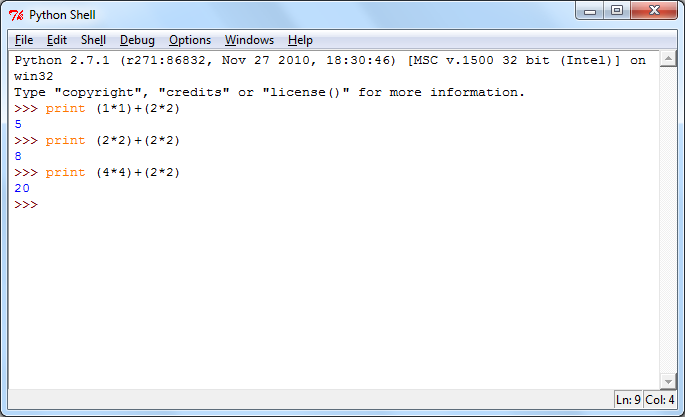
Yes I know there is inbuilt things for powers but might as well go whole hog here

 So the age old A squared + B squared to get a number that would be the last part of a right triangle. Lots of finicky stuff you do over and over while being easy to screw up but there is a simpler way and it's called a function and you can write one in the shell. Write the following

def right_triangle(a,b):
Now with annoying color
 return (a*a)+(b*b)

Hit enter twice and you'll be back to "ground level" in the shell. Now we're going to have some problems here due to blog not doing tabs right. Python for functions and scopes require indentation with whitespace, for blog code I'll use spaces, for real coding my preference is tabs. Either way I'll include what I did to the right so I can explain it a bit with graphical aids.

First you have to use def, underlined in red I'll explain why it's important latter, to create the method. After that is your methods name, it can be any thing as long as it is "one" continuous block of characters and avoids some special characters. Dashes are fine though otherwise not so much and I haven't tempted fate enough to learn the results. A space after that is your parameters or arguments underlined in green. In it's simplest form you can use as many as you want or as little as you want, even none you just put (), but you have to give them a name like any other variable and separate them with a comma. Trailing this is the colon which is the first indication of a change in scope. What this means I'll get back to later.

The right_triangle method we created is rather simple. It only has one line of code after it with a return statement followed by things I underlined in yellow. I'll get to that in a second but first lets use the method. Please type the following.

with the power of cropping you'll not see the mistake!
print right_triangle(1,2)
print right_triangle(2,2)
print right_triangle(4,2)


Admittedly this would be more impressive if the text to invoke right_triangle was less than the straight up code with the numbers that it produces. Methods allow you to reuse code and return results. Before there was the underlined piece of code with the variables a and b in it. The a and the b were the arguments passed when right_triangle was invoked in the code. The reason you have to use all the variables is that the code expects them. In the scope after it a will effectivly be whatever is passed first while b is whatever passed second. Now they don't have to be named a,b,c or any sort of sequence. Like the functions name you can name them whatever you wish as long as you separate with commas and enclose with parenthesis.

Now this doesn't have to be one line long. It can be multiple lines as long as the indentation is correct. For example.

The red line is what I called "ground level" for the code. This is where we've been typing everything out. Variables can be used and changed after we type them but now the rules are changed. Inside the function is a different scope as seen by the blue line. It is indented one more than where the def is, hence why I pointed it out before. The arguments passed through the parameter will only exsist as the variables in there and any new variables made inside will only exist until the scope ends. Scope ends by the indentation returning to normal or return statemtn is used, regardless if it returns something ro not. This functionality of return will be important later but for now it's just a neat trick.

Now this wasn't a very useful function. As I said before you could type out what it was doing in less typing than it took to make it, but once it starts getting lines long or used for other things that involve later ideas it'll start looking like a good choice. Till then hopefully I didn't butcher this idea too badly.

Wednesday, August 17, 2011

Conditional Fun: playing with snakes 4

After a day of being locked outside of a car and watching a friend get infuriated by from dust I think I shall continue the Playing with snakes series here. Last time I talked about lists mostly in preparation for loops but before that we need to work with a lot more pieces of coding. The keep it a bit short due to seeing how easy this bloats I'll stick to logic operation today.

Computers are very good at repetitive logic comparing. It is a fundamental process of how they work. Different languages have different ways of performing logic operators, for basic python it isn't too hard. The only one that provides problems is equivalency which is just '=='. I say it has problems as you can easily put the equal sign which is for assigning information to a variable. The other common ones you may remember from math class are less than '<', greater than '>', greater than or equal to '<=', and less than or equal to '>='. When python encounters these it checks whatever is before and after it and compares to the best of it's abilities and will return True or False. This will be useful in the future but for now some useless testing of theory. Please type the following or otherwise look at the image attached.

print 1==1
print 1==2
print 1>1
print 1>2
print 2>1
print 1<1
print 1<2
print 2<1


Very basic things. I could make a longer list using all of the basic 5 comparison statements but that would be overkill. Things to note this also works with characters based on ASCII designation and to a degree strings, though that is another can of worms. instead of something trivial you can use variables within the conditionals to use them for their intended purposes. The intended purpose to be used in conditional statements.

For a quick demonstration of variables in use type the follwoing

a = 4
print a<3
print a<4
print a<5
print a==5
print a==6
print a==4

Logical operators can even use two variables to compare to produce their result of Truth or false. At the moment this is pretty trivial but I believe next Playing with snakes I'll get into the if statements and scopes. After that some loops and a bit of object work and we'll have 'fighter' remade.

Thursday, August 4, 2011

Checking it twice : Playing with snakes 3

Currently house sitting again, for other family members, for other animals. Funny how being unemployed comes with perks of getting picked up and dropped off then told not to burn the house down. That aside I was thinking of continuing my playing with snakes tutorial today with basic loops before realizing just how python works. Like it or not I find this somewhat therapeutic to go over basic programing things so I'll be doing this till basic fighter is done. So with that, lists in python.

If you are familiar with other programing languages you may know the concept of arrays. Python has a similar concept that is effectively used in the same way but there are some very key differences that would take too long to explain. Effectively a list is a collection of variables, that are able to be called up through their 'position' in the list. Array deceleration, assignment, and use are slightly different than regular variables so I'll explain by showing. Please type the following.

alist=[1,2,3]
print alist[0]
print alist[1]
print alist[2]

A list is made, and then broken

Lists are signified by the Square brackets. Inside is each "item" in the list separated by commas. So this list is assigned to the alist varaible, and inisde the list is 3 items of 1,2, and 3. We are using intagers for this but anything can be put into a list, just like anything can be put into a variable. In fact you can mix types up in a list if you feel so inclined.  After that We start manually printing out the items in the list starting at index '0'.

To call an item from a list you place the index you want in square brackets immediately following it. That simple. Now you may wonder why this is worthwhile but when I get onto loops and other such controls you'll see.

Now this is where quite a few errors turn up. Humans like counting starting at 1, computers like to start at their location. I could get into the philosophy about this but that could take a while. For now remeber 0 is the starting position.

The other thing to note is what happens when we ask for the '4th' item in a list of 3. We get an out of index error. This is a bad thing, not as bad as it used to be. In the older days and in other systems when we ask outside of index we are getting unknown data that was right after the array or lists memory location. A pandoras box of unknown things that may be other variables, left over data from previous allocations, Other processes in worst case, or who knows what else. Nowadays we get errors and the program crashes to save us from ourselves. Because of the fact we would like to know the end there is a simple solution, we ask for how many items are in the list, we do this easily by typing the following.

len(alist)

By using the method len and passing along a list we will get the number of items in the list returned. With this we know if we ask for that number or higher we'll have bad things happen. Now another thing that is useful to know. We do not have to individually go through the list, we can in fact print it out in a format. Like with numbers we can use the str function with a list passed to have it printed out as a string. Try the following.

print str(alist)

With that you get a result much like if you were to set up a list. Now one last thing I would like to say about this before ending. Python has a method that produces a list of numbers, this is the range method. There are a few differnt ways to use the range method but we'll just use the most basic. Please type the following.

blist=range(3)
print str(blist)


Like this range produces X numbers starting at zero much like the index. So it will produce all the numbers from 0 to X-1 where X is the number you put into the method. You can do more fancy things with it but I'll show that latter.

With that out of the way I guess I can ask two things. Any of you out there have programing experience? The other question being what things do you find relaxing that seem odd?

Wednesday, July 27, 2011

Variable Fighter : playing with snakes part 2

I feel in a programing mood today so I'll be continuing the playing with snakes post I made a few days ago. Last time we played with some input and output in the shell. Today we move onto some variables garnished with a little scope concept.

First thing first, if you hated algebra this is like that only you don't have to solve things. You get to say what x is and everything else bends to your will. Though if you name your variables x you are going to make anyone who reads your code cry. So first thing first there is a called typing for variables. Where a variable is of a certain type, such as a string or int we used before. In other languages you would need to declare variable types, for instance in C languages you would do things such as 'int your_int" or "string your_string". Once the type is declared it won't change, if you try to assign something else it'll cause an error.

Assigning is the basic point of a variable, just having a type there makes it sort of pointless. It's very simple and as I said before like Algebra but you get to say what x should be. You simply have your variable and put '=' after it followed by what you want the variable to be. It's horribly hard to for me to explain it, so I'll have you do it, and you'll see it.

So get IDLE up and running and type the next few things.

name = "bob"
age = 20
print name
print age

More lines of code than I've ever had you done yet. Before we did everything on one line, now it's over multiple lines. You assigned "bob" to name before you assigned 20 to age and yet when print was called with name after it bob was printed, same with the age variable. This has something to do with an idea called scope. Scope is where variables exist, and where they cease to exist, but I'll get more into that later. Next I'm going to show scope not working.

Please type the following

print date
date = "July 27, 2011"
print date

Didn't work out did it? We got the wonderful red error. Yet we were able to establish the we assigned a string to the date we were able to print it out. Before the point in time where we enter 'date = "July 27, 2011"' nothing exists for date. Nothing. Anything referencing to it before we put that line down it a horrible thing that will cause your program to fail. The only reason we were able to keep typing is because we are running everything in the IDLE shell. If this were actually run as a stand alone program through the standard python interpreter you would not get the second print date to fire off, it'd be dead at the first one. While not a hard concept it'll creep up to bite you sometimes.

Now onto the next thing. Variables are reusable, they don't disappear after you use them once. For instance lets show off name and age again in a worthwhile manner with a little string concatenation. Please do the following.

print "Hello my name is "+name+" and I am "+str(age)

Just like before the str method attempts to turn anything into a string as only strings can be concatenated together. Now lets move onto the next part. Variables are well variable, you can reassign what they contain at any moment. For instance the following.

name = "rick"
print "Hello my name is "+name+" and I am "+str(age)

Bob has magicaly become rick. Now that was fun, lets change his name to Ron.

age = "Ron"
print "Hello my name is "+name+" and I am "+str(age)
fun fact I did something out of order and this is hiding it

No that was not a typo. That was an example of python not caring about type when it comes to variables when it can attempt to process them. Any variable name is fair game to be changed to any other variable type. This can cause a lot of debug problems. Like if you think you correctly changed a variable but spelled it wrong, it just makes a new variable in scope instead of replacing the old one. It'll become a possible pain when I get to objects later but I think this is enough for right now.

Next time I'll introduce the concept of methods so we won't have to type, or copy paste, 'print "Hello my name is "+name+" and I am "+str(age)' so many times.

Thursday, July 21, 2011

Reticulated programing: playing with snakes part 1

Well for a change of pace some hopefully useful or at least intriguing information if people were ever interested in programing. So with my current weapon of choice I present playing with snakes.

Image via this website

So as I like to be goal orientated to go about things we're going to make a very bare bones terminal based RPG that my friends had dubbed a long time ago the Fighter RPG. Very basic, no real options, you get to level up and chose some stats to bring up and maybe use some potions. Sounds simple, but programing it is a bit of a challenge.

First things first, you need to download the Python interpreter. For the purposes of me not having to read up on version 3 go with version 2.7. Though I doubt it'll make a difference. I don't believe version 3 broke a lot of code.

For this post I'll just stick with basic output right now. Since I'm not doing anything fancy everything is just text. 

After it extracts and you run it you'll be greeted with the shell. Which will be where we will play with today.
snake skin
The IDLE gui will work well enough to program in and it will give us some syntax coloring. Though in my experience that'll be erroneous sometimes though it'll at least show that it's an important keyword. What that means I'll get to later. For now I'll show the neat thing about interpretive languages. Right now you are able to input code and Python will execute it. For the age old starter we'll do the age old "Hello World" 'program'. To do that you'll need to type the following.

Print "Hello World"

After that just hit enter and it'll execute. You should notice Print and "Hello World" were different colors. Print is a command in the language while "Hello World" is a string, for now we'll just denote strings by the pairing of " but it can be done otherwise. Anything between the two "s will be counted as being part of the string. Print will try it's best to print out what's following after it. For instance you can print out the result of a math function. Try the following.

Print 5+4

You get the obvious result of 9. Now for a tricky part, in most languages there is a concept of  Concatination. Where you are able to combine strings together. To show this off try the following.

Print "Hello " + "World"

The result is the more complex version of Hello World above. What happens is effectively string math. It takes 'World' and 'adds' it to 'Hello ' to produce 'Hello World'. There are other math commands that python likes using with strings but I'll save those for later. Though speaking of math, what happens if we wanted to use numbers with strings? Like print out #1) for some innane reason? Well lets try it.

print "#"+1+")"

You got a big wall of red text there. That's an error, the interpreter has met with something it did not like. In this case I'll skip letting you figure out the horrors of that message and tell you what went wrong. It's an annoying part of python to me but you can not straight out concatinate strings and numeral objects. You have to convert the int, I'll explain what that means later, into a string. So to do that.

print "#"+str(1)+")"

No ugly red text. str is an inbuilt function in Python which I will get into later, all you need to know is by placing something between the brackets it'll try it's best to make it a string. Though this is an academic case, if you knew you were going to need one there you could have had it contained as "#1)". I don't know the best way to explain this but when it's in a string, it's in a string meaning when it's surrounded by "s it's seen as a character and not as a potential number by the interpretation. So you should have something like this.

I think this is week 1 of a computer science course in a nutshell


And I'll leave that as it for today. While not immediately useful it's a glimpse into programing. I may take this to completion faster if anyone is interested though it'll serve as something I like doing, showing people how to program.

Edit: Forgot to briefly touch str()